Showing posts with label Sims 3 Help and Fixes. Show all posts

Thursday, September 4, 2014

How To: Add Custom Thumbnails to Create-A-Sim stuff.

Say you just downloaded a CC, but it doesn't come with a custom thumbnail. Or, the custom thumbnail is hideous. Or maybe, like me, you want to be able to know where your CC is from (the retexturer/creater etc) just by looking at the thumbnail.

Let me show you how! (I took so long trying to find a SIMPLE way of doing this, but I finally figured it out myself by looking at the CC with custom thumbnails hahah)

P.S. If you're trying to replace the current thumbnail, you don't have to skip steps

What you need:
  • S3PE (download from here.)
    • Btw, I totally understand if you're the type of person that hates installing softwares like these to sort out your CC. But trust me, this software is awesome for organizing CC
    • For windows, you'll need to download Microsoft's .Net Framework 4 first, then download the Windows Easy Installer version.
    • For mac users, I'm not too sure, but just follow the instructions on the site I guess :D
  • A package file of the custom content that you want to change the thumbnail of
    • If you own a sim3pack file, you can convert it to package files. Instructions here.
  • A custom thumbnail
    • It should be in .png format
    • It should also be 256 x 256 pixels
    • If not, convert it using Paint (for windows) or any other simple softwares you prefer.

Instructions:
1. Make a copy of the package file and save it somewhere, just in case you mess this up.
2. Open the package file using S3PE. You'll see a lot of stuff, just scroll down to the 'CASP' part.
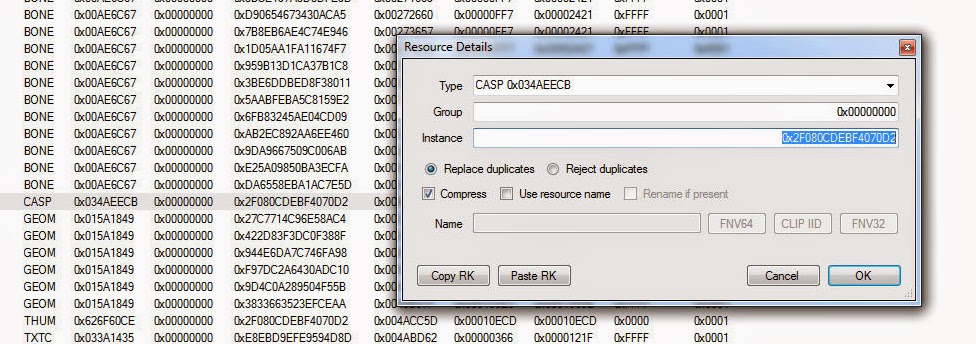
Copy the 'Instance' number

3. Double click 'CASP' and copy the 'Instance' number.
4. Right click on any blank space and click 'Add'.
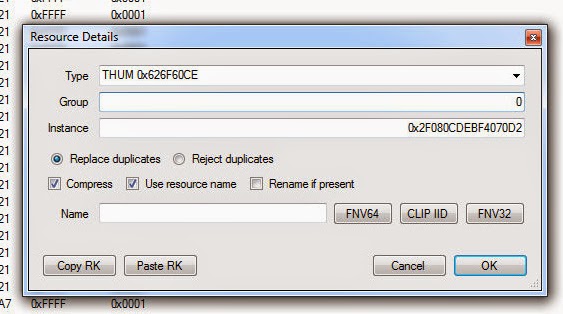
It should look something like this. Please note that your instance number will be different.


5. Look for THUM 0x626F60CE in 'Type' and type '0' in the Group. Paste the 'Instance' number in the 'Instance' box.
6. Click 'Ok'.
7. Right click on the 'THUM 0x626F60CE' and click 'Replace'.
8. Click on the picture you want.
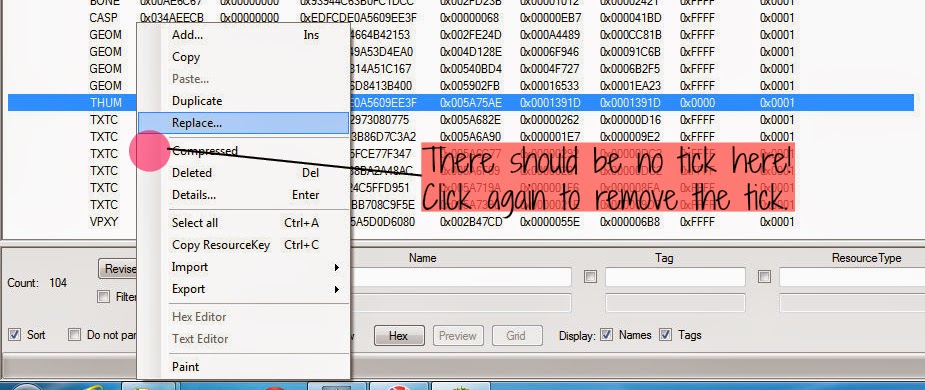
Remember to make sure that there is no tick.


9. Right click on the 'THUM 0x626F60CE' again, and click on 'Compressed' if there's a tick. There should me NO TICK!
10. Now just copy it back to your package folder and test your game to see if it's alright :)

Friday, August 29, 2014

Gift Giving Party Problems

Everytime my sim tries to throw a Gift Giving Party, the gift pile never appears. The same message always appears:

You didn't make enough space for the gifts. Hopefully, a regular house party is what you were after, because that's what you got!

And no matter how I try to delete everything, move the furnitures into the inventory or empty a room with a lot of space for the gift pile, it doesn't work.

Have the same problem? I have the solution for you.
If you had installed Seasons recently, or your sims were already staying in that house BEFORE you installed Seasons, you should just move your sims out to a new house.

So, maybe some of you are thinking, I really love the house/I spent a lot of time building it just for this sim family and I really don't want to move out.. I feel you, I really do.. Try the following solutions:

1. Download/reinstall the house you downloaded (from wherever you downloaded it from). If you already have the house in your Lots Library, you can skip this step.
2. Move your family out into the family bin or if you don't want it in the family bin, just move them out to an empty lot or a temporary house.
3. Replace the house with the 'new' one (the one in the Library that you just installed/saved when you built the house).
4. Move your family back in.

Q: I built the house myself and didn't save a copy of it in the Library or I forgot where I downloaded it from!
This may not work for everyone. It only worked for some of my saved games :(
1. Move the family out into the family bin or to an empty lot/temporary house.
2. Save the house in your Lots Library.
3. Bulldoze the original lot.
4. Place the house back on the lot.
5. Move your family back in

Q: It still doesn't work!
Download this mod made by NonaSims that allows you to buy the gift pile from buy mode. If you don't like installing mods in your game, you could have the gift giving party at another location. For me, I bought an additional house for my sim and they were able to have the gift giving party there.

Download the mod here

Please note that I did not create this mod, and am not responsible for whatever it does to your game. This worked for me, and hopefully it will work for you too.